Home / Guides / Design and Illustration
Book Cover Size and Dimensions: Ebook, Paperback, Audiobook
 By AuthorWings editorial team
6 min read
By AuthorWings editorial team
6 min read
Short answer
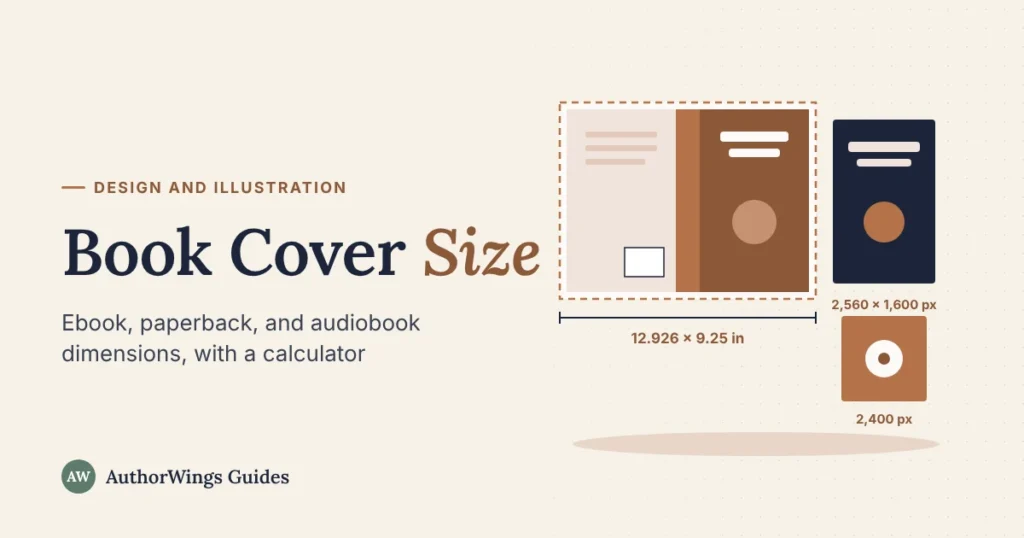
A Kindle ebook cover should be 2,560 pixels high by 1,600 wide. A paperback cover is one wide file: twice the trim width, plus the spine, plus 0.125 inch of bleed on each side, and the trim height plus 0.25 inch. A 300-page 6 x 9 paperback on white paper needs a 12.926 x 9.25 inch cover.
Every format needs a different cover size: an ebook cover is measured in pixels, a print cover in inches, and an audiobook cover is square. This guide gives each size from the platforms’ own help pages (checked October 2026), a calculator for your paperback, and the file rules that go with them. If you’d rather not build the files yourself, a book cover designer sets them up for every format.
Ebook cover size by store
Ebook covers are a single front image. Each store publishes its own minimum, so one large file usually covers them all.
| Store | Size | File |
|---|---|---|
| Amazon Kindle (KDP) | Ideal 2,560 px high x 1,600 px wide (1.6 to 1); minimum 1,000 x 625 px | JPEG or TIFF, RGB, under 50 MB |
| Apple Books | At least 1,400 px on the shorter side | JPEG or PNG, RGB |
| Kobo Writing Life | 3 to 4 width to height recommended | JPG or PNG, up to 5 MB |
| Barnes & Noble Press | At least 1,400 px on each side recommended | JPG or PNG |
| Google Play Books | 640 to 7,200 px high and wide | JPEG, PNG, TIFF, or PDF |
| IngramSpark | At least 1,600 px on the short side and 1,873 px on the long side | JPG only, RGB, up to 100 MB |
| Draft2Digital | 1,600 x 2,400 px recommended | JPEG |
A 1,600 x 2,560 pixel cover meets every minimum in the table. Kobo recommends a 3 to 4 shape, so if you sell there, check how your cover looks in Kobo’s preview or make a 3 to 4 version, such as 1,920 x 2,560 pixels.
Print cover size: how the full wrap is measured
A paperback cover is one file that wraps the book: back cover, spine, and front cover side by side, with bleed around the outside. On KDP:
- Width = 0.125 in bleed + trim width (back) + spine width + trim width (front) + 0.125 in bleed.
- Height = trim height + 0.25 in (0.125 in of bleed at the top and bottom).
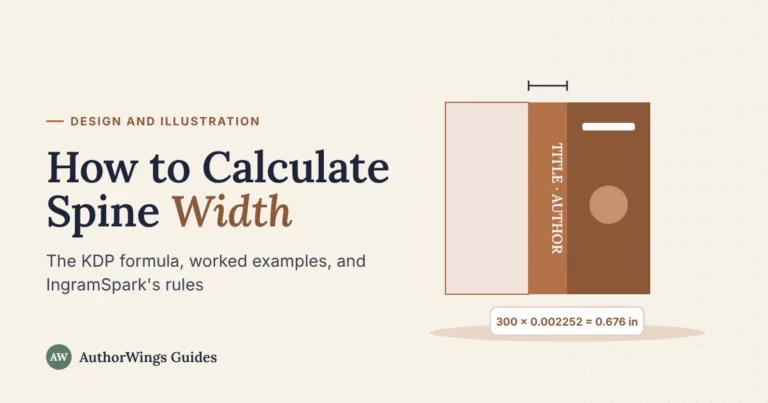
- Spine width = page count x the paper’s thickness: 0.002252 in per page for white paper, 0.0025 in for cream, and 0.002347 in for premium color. Our guide to calculating spine width has worked examples.
Example: a 300-page, 6 x 9 inch paperback on white paper has a 0.676 inch spine (300 x 0.002252), so the cover is 12.926 inches wide and 9.25 inches tall, or 3,878 x 2,775 pixels at 300 DPI. Your trim size and final page count set the numbers, so build the print cover last.
Book cover size calculator
Enter your trim size, page count, and paper to get your KDP paperback cover size in inches, millimeters, and pixels.
Paperback cover size calculator (KDP)
Uses KDP’s published spine thickness per page. Check the final size against KDP’s own cover template before you upload.
Width = 0.125 in bleed + back + spine + front + 0.125 in bleed. Height = trim height + 0.25 in. IngramSpark’s spine can differ, so build that cover on its own template.
The formula: spine width = page count x paper thickness (white paper 0.002252 in per page, cream 0.0025 in, premium color 0.002347 in, standard color 0.002252 in). Full cover width = 0.125 + trim width + spine + trim width + 0.125 in. Height = trim height + 0.25 in. Example: a 300-page 6 x 9 book on white paper has a 0.676 in spine and a 12.926 x 9.25 in cover.
Treat the result as a check. Before you upload, download KDP’s cover template for your book from its cover calculator; the template marks the spine, bleed, and barcode area exactly.
Hardcover cover size
A hardcover cover wraps around the boards, so it’s bigger than a paperback cover for the same book. On KDP, the cover wraps 0.51 inch past the edge of the front cover instead of the 0.125 inch bleed, a 0.4 inch hinge sits next to the spine with no text or barcode in it, and text stays 0.635 inch from the edge. KDP doesn’t publish a single formula for hardcover covers, so use the template from its cover calculator, set to hardcover.
Audiobook cover size
Audiobook covers are square. ACX, which supplies Audible, asks for at least 2,400 x 2,400 pixels in RGB, up to 8 MB, with no price or barcode. Our guide on how to make an audiobook covers the rest of the ACX specs.
File rules for each format
The size is only half of it; each format also has its own file type and color setting.
| Format | File | Color | Resolution |
|---|---|---|---|
| Ebook | JPEG (TIFF on KDP, PNG on some stores) | RGB | Set by pixels (KDP recommends 300 ppi) |
| Paperback and hardcover | One PDF with bleed (PDF/X-1a or PDF/X-3 for IngramSpark) | CMYK | 300 DPI at final size |
| Audiobook | JPG, square | RGB | At least 2,400 x 2,400 px |
When to get help
Getting every file right for every store takes time, and the print cover has to be redone if your page count changes. AuthorWings cover design is $199 for an ebook cover, $399 for Print-Ready (ebook, paperback, and hardcover covers), and $999 for an illustrated cover, with an audiobook cover as a $149 extra. Print files are checked for bleed, spine width, color, and resolution against KDP and IngramSpark before delivery.
Book cover design
Every cover file, sized for every store
A designer matched to your genre builds your ebook, paperback, and hardcover covers and checks each file against KDP and IngramSpark.
- Ebook from $199
- Print-Ready $399
- Audiobook cover $149
Frequently asked questions
What size should a book cover be in pixels?
For a Kindle ebook, KDP’s ideal is 2,560 pixels high by 1,600 wide. For print, multiply the cover’s size in inches by 300: the front of a 6 x 9 inch book is 1,800 x 2,700 pixels, and the full paperback cover adds the back, the spine, and the bleed. Audiobook covers need at least 2,400 pixels square.
What is the most common book cover size?
KDP says 6 x 9 inches is the most common paperback trim size in the US, so 6 x 9 is a common size for the front of a print cover. The full paperback cover is wider, because it adds the back, the spine, and bleed: a 300-page 6 x 9 book on white paper needs a 12.926 x 9.25 inch cover.
Can I use the same ebook cover for every store?
Usually, yes. A 1,600 x 2,560 pixel JPEG meets the minimums for Kindle, Apple Books, Barnes & Noble, Google Play, and IngramSpark. Kobo recommends a slightly wider 3 to 4 shape, so check your cover in Kobo’s preview, and keep the file in RGB color for every store.
What resolution should a book cover be?
For print, every image needs at least 300 DPI at the size it will print, and the cover file should be CMYK. For ebooks, the pixel dimensions matter more than the DPI setting; KDP recommends 300 ppi, but the pixel size is what stores check. Start with a large, high-resolution design and export each format from it.
Related reading
AuthorWings editorial team
The AuthorWings editorial team writes and updates our guides for first-time authors. Every post is read and edited by a person on our team before it is published.