Home / Guides / Design and Illustration
How to Calculate Spine Width for KDP and IngramSpark
 By AuthorWings editorial team
6 min read
By AuthorWings editorial team
6 min read
Short answer
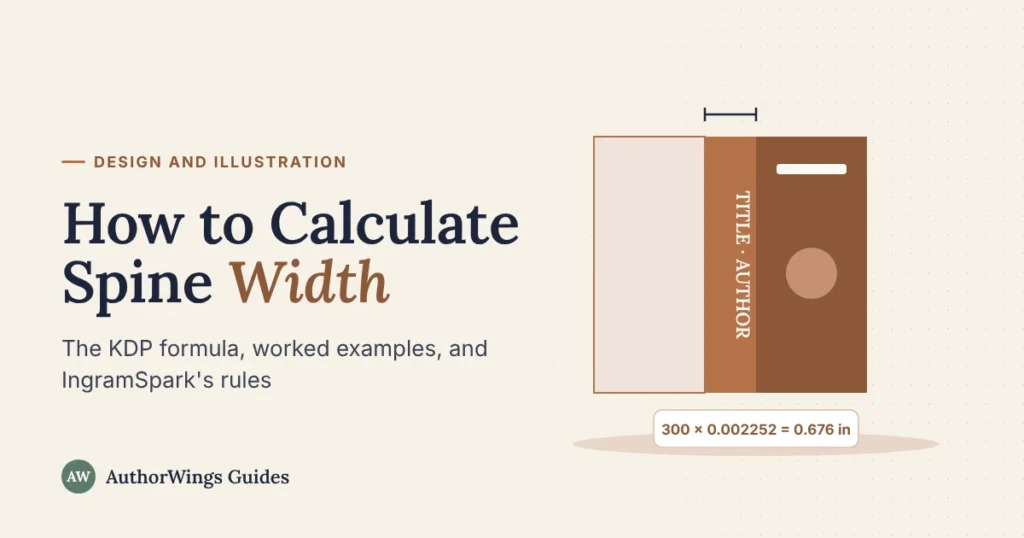
On KDP, spine width is your page count times the paper’s thickness: 0.002252 inch per page for white paper, 0.0025 for cream, and 0.002347 for premium color. A 300-page book on white paper has a 0.676 inch spine. IngramSpark doesn’t publish a formula, so get your spine width from its cover template generator.
The spine is the only part of a print cover whose size depends on the inside of the book, so it’s the last number you can fix. This guide shows the formula, worked examples, and the rules for spine text. To get the full cover size, use our book cover size calculator. If you’d rather hand the files off, our print book formatting sets the interior and page count first.
The KDP spine width formula
KDP publishes the thickness of each paper, so the spine width is one multiplication:
- White paper, black ink: page count x 0.002252 in (0.0572 mm)
- Cream paper, black ink: page count x 0.0025 in (0.0635 mm)
- White paper, premium color ink: page count x 0.002347 in (0.0596 mm)
- White paper, standard color ink: page count x 0.002252 in (0.0572 mm)
Use the page count of your final print PDF. KDP counts every page in the file, blank ones included, and rounds up to an even number. Cream paper is thicker than white, so the same book has a wider spine on cream.
Spine width examples by page count
Here are KDP paperback spine widths, in inches, for common page counts.
| Pages | White paper | Cream paper | Premium color |
|---|---|---|---|
| 32 | 0.072 | 0.080 | 0.075 |
| 100 | 0.225 | 0.250 | 0.235 |
| 150 | 0.338 | 0.375 | 0.352 |
| 200 | 0.450 | 0.500 | 0.469 |
| 250 | 0.563 | 0.625 | 0.587 |
| 300 | 0.676 | 0.750 | 0.704 |
| 400 | 0.901 | 1.000 | 0.939 |
| 500 | 1.126 | 1.250 | 1.174 |
Worked example: a 300-page, 6 x 9 inch novel on cream paper has a 0.75 inch spine (300 x 0.0025). The full cover is 0.125 + 6 + 0.75 + 6 + 0.125 = 13 inches wide and 9.25 inches tall. The book cover size calculator does this for any trim size.
When you can put text on the spine
A thin spine can’t hold readable text, and both platforms set a minimum:
- KDP: spine text needs at least 79 pages (the same KDP help page also says “more than 79”, and Cover Creator asks for 80, so 80 is the safe number). Keep spine text 0.0625 inch from each fold line, because the fold can shift slightly in printing.
- IngramSpark: no spine text on perfect bound (paperback) books under 48 pages. Spine text stays inside a safety margin of 0.0625 inch when the spine is wider than 0.35 inch, or 0.03125 inch when it’s narrower.
At 79 pages on white paper, a KDP spine is about 0.18 inch wide, so keep spine text small and simple: title and author name, or the author’s surname alone.
Spine width on IngramSpark
IngramSpark doesn’t publish a per-page figure. Its File Creation Guide says to build the cover on the template from its cover template generator, using a page count divisible by 2, and the template shows the spine width for your trim size, paper, and binding. Spine widths can differ from KDP’s for the same book, so if you print with both, build a separate cover for each on its own template (see KDP vs IngramSpark).
Hardcover spine width
A hardcover spine is usually wider than the paperback’s, because the cover wraps around boards. KDP doesn’t publish a per-page figure for hardcovers; its cover calculator, set to hardcover, generates the layout with the spine, the 0.51 inch wrap, and the 0.4 inch hinge on each side. Use that template, and for IngramSpark, its template for case laminate or dust jacket covers.
Spine width for children’s books
Picture books are thin, so their spines are narrow. A 32-page picture book on KDP’s premium color paper has a spine of about 0.075 inch, too narrow for spine text on either platform, so the cover has a plain spine in a color that joins the front and back art. For hardcover picture books, see our guide to self-publishing a hardcover children’s book, and for the full process, how to format a children’s book.
Spine width mistakes to avoid
These are the usual reasons a cover has to be redone:
- Building the cover before the page count is final. Every added page widens the spine.
- Using KDP’s spine width on IngramSpark, or the other way round. Use each printer’s own template.
- Choosing the wrong paper. Cream and white give different widths.
- Text too close to the fold. It can wrap onto the front or back cover.
- Forgetting blank pages. They count toward the page count, and so toward the spine.
When to get help
Spine width changes with every edit to the inside of the book, which is why covers and formatting work best together. AuthorWings print formatting starts at $199, and Print-Ready cover design at $399 includes the paperback and hardcover covers, with files checked for bleed, spine width, color, and resolution against KDP and IngramSpark before delivery.
Print formatting and covers
An interior and cover that fit together
We format your interior first, then size your cover to the final page count, and check both against KDP and IngramSpark.
- Print formatting from $199
- Print-Ready cover $399
- Paperback wrap $149
Frequently asked questions
How do I calculate the spine width of my book?
On KDP, multiply your page count by the paper’s thickness: 0.002252 inch per page for white paper, 0.0025 for cream, or 0.002347 for premium color. A 200-page book on white paper has a 0.45 inch spine. On IngramSpark, take the spine width from the template its cover template generator creates for your book.
How many pages do you need for spine text?
On KDP, spine text needs at least 79 pages, and 80 is the safe number because KDP’s help words it two ways. On IngramSpark, paperbacks under 48 pages can’t have spine text. Even above the minimum, a thin spine only fits a short title and author name in small type.
Why is my IngramSpark spine different from KDP’s?
The two printers use different papers and calculate the spine their own way, and IngramSpark doesn’t publish a per-page figure. That’s why the same book can need a slightly different cover for each. Build each cover on its own printer’s template rather than reusing one file for both.
Does the spine width change if I add pages?
Yes. Every page you add widens the spine, so the whole cover gets wider too. Finish the interior, export the final print PDF, and use its exact page count, including blank pages, before you build the print cover. If the page count changes later, resize the spine and recheck the template.
Related reading
AuthorWings editorial team
The AuthorWings editorial team writes and updates our guides for first-time authors. Every post is read and edited by a person on our team before it is published.