Home / Guides / Comics and Graphic Novels
Comic Book Size: Page Dimensions, Page Count and Format
 By AuthorWings editorial team
9 min read
By AuthorWings editorial team
9 min read
Short answer
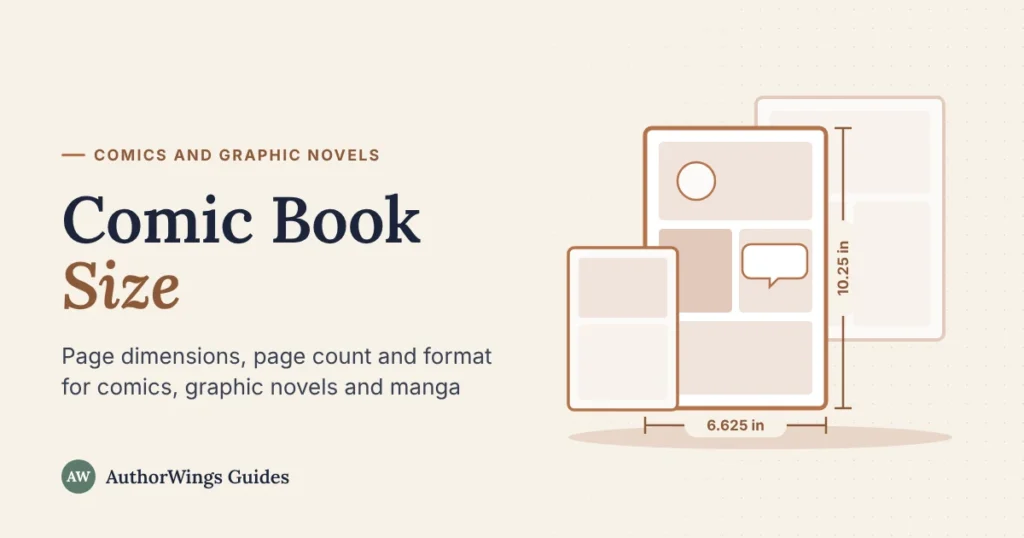
A standard US comic book page is 6.625 × 10.25 inches. On Amazon KDP, graphic novels can use the standard 6 × 9 or 7 × 10 inch sizes, or 6.625 × 10.25 as a custom paperback size. English-language manga is about 5 × 7.5 inches. Pick the size before you draw, since changing it later crops art.
Trim size is the finished page size after the printer cuts the paper. It sets your canvas, your panel layout and which printers can make your book. Here are the sizes for each format, the page counts that go with them, and the file settings you need. If you’d rather hand the art to a professional, our graphic novel illustration team draws to any of these sizes.
Comic and graphic novel sizes by format
Each format has a size readers expect. Saddle stitch means stapled through the fold. Perfect bound means a glued, square spine, like a paperback novel.
| Format | Trim size | Typical pages | Binding | Amazon KDP paperback |
|---|---|---|---|---|
| US comic (single issue) | 6.625 × 10.25 in | 24 to 32* | Saddle stitch | Custom size, glued spine only |
| Trade paperback (collected issues) | 6.625 × 10.25 in | 96 to 200* | Perfect bound | Custom size |
| Graphic novel | Any size; 6 × 9 and 7 × 10 in are standard on KDP | Varies; middle grade often 150 to 200 | Perfect bound or hardcover | Standard size at 6 × 9 or 7 × 10 in |
| Manga, English edition | About 5 × 7.5 in | 150 to 250* | Perfect bound | Custom size |
| Manga, Japanese edition | B6, 128 × 182 mm | Varies by series | Perfect bound | Custom size |
| Digest | 5.5 × 8.5 in | 80 to 160* | Perfect bound | Standard size |
| European album | Near A4 (8.27 × 11.69 in) | 48 to 64 | Hardcover | A4 is a standard size |
| Magazine size | 8.5 × 11 in | Varies | Saddle stitch or perfect bound | Standard size |
| Webcomic | Under 800 px wide, any length | One episode at a time | Online | Not printed |
Sizes from printer and platform spec sheets, as of October 2026. *Page ranges marked with an asterisk are as listed by one large comic printer. Your own printer’s spec sheet is the final word.
Five comic page sizes, drawn to scale
Each outline is one printed page at its trim size, standing on the same baseline.
- 15 × 7.5 inEnglish manga. KDP custom size
- 26 × 9 inGraphic novels. KDP standard size, paperback and hardcover
- 36.625 × 10.25 inStandard US comic. KDP custom size, paperback only
- 47 × 10 inGraphic novels. KDP standard size, paperback and hardcover
- 58.5 × 11 inMagazine size. KDP standard size
Amazon KDP sizes as of October 2026. Custom sizes are paperback only on KDP.
The standard comic book size, and where you can print it
The classic American comic page is 6.625 × 10.25 inches. It’s the size of a monthly issue in a comic shop, and many trade paperbacks keep it.
Amazon KDP, Amazon’s print-on-demand platform, doesn’t list this size among its standard trims, but it prints it as a custom trim size for paperbacks (as of October 2026). KDP accepts any paperback size from 4 to 8.5 inches wide and 6 to 11.69 inches tall. Four points to know:
- Paperback only. KDP hardcovers come in 5 standard sizes. The nearest to a comic is 7 × 10 in.
- Bookstore reach may be limited. KDP’s Expanded Distribution, which offers your book to bookstores and libraries, lists only standard sizes on its eligibility chart.
- Check before you draw. KDP doesn’t say which ink and bleed options apply at custom sizes. Enter the size in your KDP setup and check the options it offers first.
- Glued spine, no staples. KDP binds every paperback with glue, so a stapled single issue needs a comic or offset printer.
IngramSpark, another print-on-demand platform, lists 6.625 × 10.25 in on its trim size list (as of October 2026). Check its binding and ink options for that size before you draw. Comic printers and offset printers print the size too, and offer stapled binding. An offset printer prints a set quantity in one run, and the cost per copy drops as the quantity rises.
Want the classic size on Amazon? Set a custom trim in KDP. Want a hardcover or bookstore distribution at that size? Check IngramSpark’s options, or switch to 7 × 10 inches, a standard KDP size. Want stapled issues? Use a comic or offset printer.
Page counts for single issues, graphic novels and manga
Page count depends on the format and the binding, and every printer sets its own limits.
- Single issues: one large comic printer lists 24 to 32 printed pages. Comic writer John Ostrander puts the story in a monthly issue at 22 pages.
- Stapled books need a page count in multiples of 4, covers included, because each folded sheet makes 4 pages. Stapling works up to about 64 pages.
- Trade paperbacks collect several issues of a series in one book.
- Graphic novels vary widely in length. Literary agent Britt Siess puts middle grade graphic novels at 150 to 200 pages, well past the stapling limit.
- Manga volumes: one large comic printer lists 150 to 250 pages. See how manga differs from a graphic novel.
- Amazon KDP paperbacks need at least 24 pages with black or premium color ink, and at least 72 with standard color ink. The maximum at 6 × 9 and 7 × 10 in is 828 pages in black ink.
- Amazon KDP hardcovers need 75 to 550 pages.
KDP page limits as of October 2026.
Past about 64 pages, staples struggle to hold, so plan a perfect-bound book.
How many panels fit on a comic page
There’s no fixed rule, but writers use rough averages. Comic writer John Ostrander estimates about 5 panels a page for US comics. Writer Buzz Dixon suggests 3 to 4 for manga, which gives each moment more room.
| Panels | What it does | Use it for |
|---|---|---|
| 1 (splash page) | Stops the reader | Openings, big reveals |
| 2 to 3 | Slows the pace | Calm, wide scenes |
| 4 to 6 | Steady reading | Everyday story pages |
| 7 to 9 | Speeds up, tight beats | Fast talk, comic timing |
A smaller trim fits fewer panels. A 9-panel grid that reads well at 7 × 10 in can feel cramped at 5 × 7.5 in. So pick the size first, then plan the panels. Our free comic page templates have eight panel layouts drawn on real pages in three sizes.
Drawing size vs print size
Draw at print size or larger, at the right resolution, so the file prints sharp and fits the page. DPI means dots per inch. Printers ask for at least 300 DPI for color art, and 400 to 600 DPI for black-and-white line art. 600 DPI keeps thin lines sharpest.
Many traditional comic artists draw on 11 × 17 inch art boards and reduce the art to print size. If you draw digitally, set the canvas to your trim size plus bleed. Bleed is the extra 0.125 inch of art past the cut line, so no white edge shows after trimming.
| Trim size | Page with bleed | Canvas at 300 DPI (color) | Canvas at 600 DPI (line art) |
|---|---|---|---|
| 6.625 × 10.25 in (comic printer) | 6.875 × 10.5 in | 2,063 × 3,150 px | 4,125 × 6,300 px |
| 7 × 10 in (Amazon KDP) | 7.125 × 10.25 in | 2,138 × 3,075 px | 4,275 × 6,150 px |
| 6 × 9 in (Amazon KDP) | 6.125 × 9.25 in | 1,838 × 2,775 px | 3,675 × 5,550 px |
| 5 × 7.5 in (manga, offset) | 5.25 × 7.75 in | 1,575 × 2,325 px | 3,150 × 4,650 px |
Comic and offset printers add 0.125 in of bleed on all four sides. Amazon KDP adds it on the top, bottom and outside edge only, so a KDP page with bleed is 0.125 in wider and 0.25 in taller than the trim. Pixel sizes are rounded up.
Webcomics work differently: one long vertical strip. On WEBTOON, keep each image under 800 px wide and 1,280 px tall to avoid automatic slicing, at 2 MB or less per image (as of October 2026). Keep a high-resolution master too, in case you print a collected edition later.
Print specs at a glance
Printers ask for the same handful of specs. Confirm each one with your printer before you start drawing.
- Bleed: 0.125 in past the trim wherever art runs to the edge.
- Safe area: keep balloons, captions and faces inside it. Comic printers often ask for at least 0.25 in. Amazon KDP needs at least 0.375 in on the outside edges with bleed, and an inside margin that grows from 0.375 in to 0.875 in as the page count rises.
- Resolution: at least 300 DPI for color and 400 to 600 DPI for black-and-white line art, at final print size.
- Color mode: CMYK for comic and offset printers, using your printer’s color profile. RGB for screens and webcomics.
- Files: a print-ready PDF, set up to your printer’s spec.
Our printable comic page templates use a 0.5 inch safe area, which clears KDP’s margins for books up to 300 pages.
How to choose your comic’s size in 3 questions
- Where will you sell it? Amazon first: 6 × 9 or 7 × 10 in, or 6.625 × 10.25 in as a custom paperback size. Hardcover or bookstores at the classic size: check IngramSpark’s options, or use 7 × 10 in on KDP. Stapled issues for comic shops or conventions: a comic or offset printer. Online only: a webcomic canvas.
- How many pages? Up to about 64: a stapled issue works. Over 64: perfect bound. A KDP hardcover needs at least 75.
- Which format? English manga is about 5 × 7.5 in. A classic American comic is 6.625 × 10.25 in. A large album with detailed art suits 8.5 × 11 in.
Still choosing a format? See what a graphic novel is and how it differs from a comic book. For the full process from script to print files, read how to make a comic book.
When to get help
Size sets everything that follows: canvas, panel count, page count and printer. Getting it right first saves redrawing pages later. If you have a script and want the pages drawn to your chosen size, an illustrator can draw every page and deliver print-ready files.
Comic and graphic novel illustration
Your script, drawn to the size you print.
One illustrator draws your whole comic from character sheets you approve, at your trim size, with lettering in every page price.
- Full-color page: $249, or $219 from 24 pages
- Black-and-white page: $199, or $169 from 24 pages
- Manga page with screentone: $199, or $169 from 24 pages
Frequently asked questions
Can I print a standard-size comic on Amazon KDP?
Yes, as a paperback. The classic 6.625 × 10.25 inch size isn’t one of KDP’s standard trims, but KDP accepts custom paperback sizes from 4 to 8.5 inches wide and 6 to 11.69 inches tall (as of October 2026). Hardcovers must use a standard size, and the nearest is 7 × 10 inches. For a hardcover at the classic size, check IngramSpark’s options. For a stapled issue, use a comic or offset printer.
What size is a manga page?
English-language manga is about 5 × 7.5 inches. Japanese volumes often use B6, which is 128 × 182 mm, or about 5 × 7.2 inches. Both fit Amazon KDP’s custom paperback range (as of October 2026), or you can use KDP’s standard 5 × 8 inch size, half an inch taller than 5 × 7.5. Pick the size before drawing, because the page shape sets your panel layout.
What canvas size should I draw a comic on?
Use your trim size plus bleed, at 300 DPI for color or 600 DPI for black-and-white line art. For a standard 6.625 × 10.25 inch comic, that’s 2,063 × 3,150 pixels at 300 DPI. For a 6 × 9 inch book on Amazon KDP, it’s 1,838 × 2,775 pixels. Many artists draw larger and scale down, keeping the same proportions.
What DPI should comic pages be?
Color pages need at least 300 DPI at final print size. For black-and-white line art, printers ask for 400 to 600 DPI, and 600 looks cleanest, because thin ink lines and screentone dots blur at lower resolution. Set the resolution when you create the canvas. Raising the DPI of a finished low-resolution file adds pixels but not detail, so the print still looks soft.
Related reading: How to make a comic book · Free comic book and graphic novel templates · What is a graphic novel?
AuthorWings editorial team
The AuthorWings editorial team writes and updates our guides for first-time authors. Every post is read and edited by a person on our team before it is published.