Home / Guides / Publishing
How Long Does KDP Review Take? Timelines for 2026
 By AuthorWings editorial team
Updated
8 min read
By AuthorWings editorial team
Updated
8 min read
Short answer
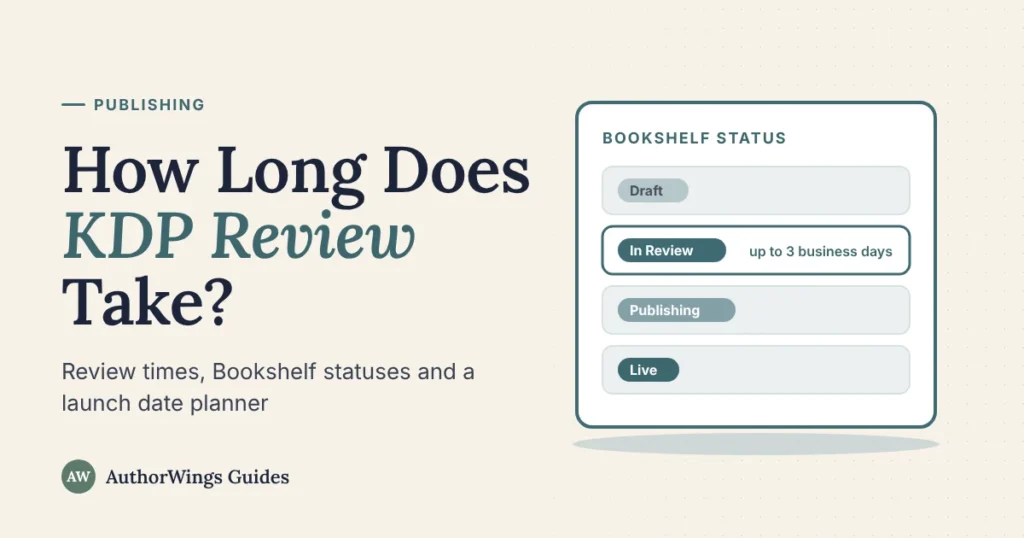
KDP says a new book takes up to 3 business days to go live after you submit it, and changes to a live book up to 72 hours. A first print book on a new account can take up to 6 days, and low-content books such as journals 3 to 4 weeks. Search can take 72 more hours.
KDP is Amazon’s self-publishing platform, and every book and update goes through its review before it goes on sale. This guide shows how long each step takes, what each status on your Bookshelf means, and how to plan a launch date around it. If you’d rather hand it over, our Amazon publishing setup handles the uploads and the review in your name.
KDP review times at a glance
| What you submit | How long KDP says it takes |
|---|---|
| New ebook, paperback or hardcover | Up to 3 business days to go live |
| First print book on a new account | Up to 6 days |
| Low-content book (journal, notebook) | 3 to 4 weeks |
| Ebook pre-order | Typically 24 to 72 hours to be reviewed and published; final manuscript due at least 72 hours before release day, or KDP cancels the pre-order |
| Print book with a scheduled release date | Up to 72 hours; release date up to 90 days out, and the book is locked for changes 5 days before release |
| Ebook with an Audible audiobook | Up to 7 days |
| Changes to a live book’s files or details | Up to 72 hours |
| Ebook price change | 24 hours |
| Print price change | 72 hours to 5 business days |
KDP Timelines and Book Status help pages, checked October 2026. KDP calls these estimates, and times vary by book type and Amazon store.
KDP reviews books in the order they arrive, and contacting support won’t speed it up. Reviews can’t be canceled either.
What each status on your Bookshelf means
| Status | What it means | What to do |
|---|---|---|
| Draft | Not submitted, or sent back after review | If it was In Review and is back in Draft, check your email, fix what KDP asks, then resubmit |
| In Review | KDP is checking it against its formatting and content guidelines | Wait. The book is locked for changes |
| Publishing | It passed review and is going live | Wait for Live |
| Live | On sale on Amazon | Check the detail page, then search for it after up to 72 hours |
| Live – with unpublished changes | You edited a live book but haven’t submitted the changes | Submit them; they go through review |
| Live – Updates in review | On sale, and your latest changes are being reviewed | The book stays Live; you can’t make more changes until these are published |
| Live – Updates publishing | Your changes passed review | Wait for them to show |
| Blocked | It doesn’t meet KDP’s content guidelines | Read KDP’s email and reply to it to reach support |
There’s no “rejected” status. If KDP finds a problem, your book goes back to Draft and KDP emails you the reason.
After “Live”: search, linked formats and Look Inside
Live means readers can buy the book. A few things take longer to catch up:
- Search results: up to 72 hours after the book is live.
- Print detail page: up to 72 hours on Amazon.com and up to 5 days in other stores (up to 30 days on Amazon.ca).
- Ebook and print on one page: up to a week after each edition is live, as long as the title, author and other details match exactly and both are in the same KDP account. Our guide to ASIN vs ISBN explains how Amazon links formats.
- Look Inside: 7 to 8 business days for ebooks and 9 to 10 for print.
- Reviews copied from print to ebook: usually 3 to 5 days.
- A+ Content: within 8 business days if it meets KDP’s A+ guidelines (longer in busy periods).
- Expanded Distribution: up to 8 weeks before bookstores and libraries can order the paperback.
How long changes take after you publish
Changes to a live book go through review again, usually within 72 hours, and the book stays Live meanwhile. Some things can’t be changed later:
- Print title, subtitle or author name: you can change them only within 72 hours of first publishing, and the change goes back through review. After that, you create a new edition.
- Trim size, and most ink and paper changes: these need a new edition too (KDP allows some paper-type switches on black-and-white titles). See our guide to KDP trim sizes before you choose.
- KDP Select: you can enroll your ebook while it’s a draft or after it’s live, and cancel within 3 days of the start of a term. See what KDP Select is.
What slows a review down
- File problems: blank pages, text outside the margins, or a cover that doesn’t match the page count.
- Book details that don’t match the book, such as a title on the cover that differs from the one you typed.
- Rights checks: KDP may ask you to prove a work is in the public domain, and it won’t accept copyrighted text that’s free online unless the copyright owner provides it. These checks can make a review take longer.
- AI disclosure: you must tell KDP about AI-generated text, images or translations when you publish or republish.
- Book type: low-content books and first print books on new accounts take longer.
- Busy periods: KDP calls its times estimates, and says high volume can stretch low-content and A+ Content reviews.
What to do if your book is stuck in review
- Check your email, including spam. If KDP needs something, it writes to you, and your book may be back in Draft.
- Check the status on your Bookshelf against the table above.
- Count business days, not calendar days. A book submitted on Friday afternoon has until the middle of the next week.
- Wait for the longer windows if they apply: 6 days for a first print book on a new account, 3 to 4 weeks for low-content books.
- Contact KDP if it’s well past these times and you have no email from KDP. Contacting support won’t speed up a normal review.
Plan your launch date
If you’re planning a launch, count back from the date readers should be able to find the book, not the date it goes on sale. For the marketing side, use the 8-week book launch checklist.
Free planner
KDP launch date planner
Pick your launch date and book type. It counts back using KDP’s published review times.
KDP’s times are estimates. Business days skip weekends but not US holidays such as Thanksgiving or Christmas, so add a day for each.
When to get help
The review itself is quick. What delays books is a problem KDP finds, and the back-and-forth to fix it. Our Amazon tier ($249) checks your ebook file before launch and publishes it in your name; Online Stores ($549) adds four more ebook stores and an Amazon paperback, with both files checked. To do it yourself, follow our guide to publishing on Amazon step by step.
Amazon publishing
Want help getting through KDP review?
We check your files, set up your book on KDP in your name and handle any fixes KDP asks for.
- Amazon, $249: your Kindle ebook, file checked before launch
- Online Stores, $549: adds four more ebook stores and an Amazon paperback
KDP review questions
Why is my KDP book still in review after 72 hours?
KDP’s standard time is up to 3 business days, not 72 hours, so a weekend can push it longer. A first print book on a new account can take up to 6 days, and low-content books 3 to 4 weeks. Check your email in case KDP needs something. Contacting support won’t speed up a normal review.
Can I edit my book while it’s in review?
No. KDP locks a book for changes while it’s In Review, and the review can’t be canceled. Once it’s live, you can submit changes, which are reviewed again, usually within 72 hours, and the book stays Live meanwhile. A print book’s title and author can be changed only within 72 hours of first publishing.
Does KDP review take longer for a new account?
For print, it can. KDP says a paperback or hardcover from an account that hasn’t published a book before may take up to 6 days. Check that your files meet KDP’s guidelines and your book details match the cover, so the first review isn’t sent back, and allow the extra days in your launch plan.
Why can’t I find my book on Amazon after it went live?
Search can lag. KDP says a live book takes up to 72 hours to appear in search results, and a print detail page can take up to 5 days in other Amazon stores and up to 30 days on Amazon.ca. Use your book’s direct link from your Bookshelf meanwhile. If it still doesn’t show after that, contact KDP with your ASIN.
Related reading: How to self-publish on Amazon · What is KDP Select? · KDP trim sizes
AuthorWings editorial team
The AuthorWings editorial team writes and updates our guides for first-time authors. Every post is read and edited by a person on our team before it is published.