Home / Guides / Design and Illustration
Bleed vs No Bleed on KDP: Which to Choose (and How)
 By AuthorWings editorial team
6 min read
By AuthorWings editorial team
6 min read
Short answer
Choose bleed on KDP only if something on an inside page should run off the edge, such as a full-page photo, a background color, or a border. Text-only books use no bleed. Bleed adds 0.125 inch to the top, bottom, and outside edges, needs a PDF upload, and doesn’t change KDP’s printing cost.
Bleed is one of the print options you choose in KDP’s paperback setup, and picking the wrong one is a common reason a file needs fixing. This guide explains what each option means, helps you decide, and shows how to set up the file. If you’d rather hand it off, our print book formatting team sets it up for you.
What bleed means on KDP
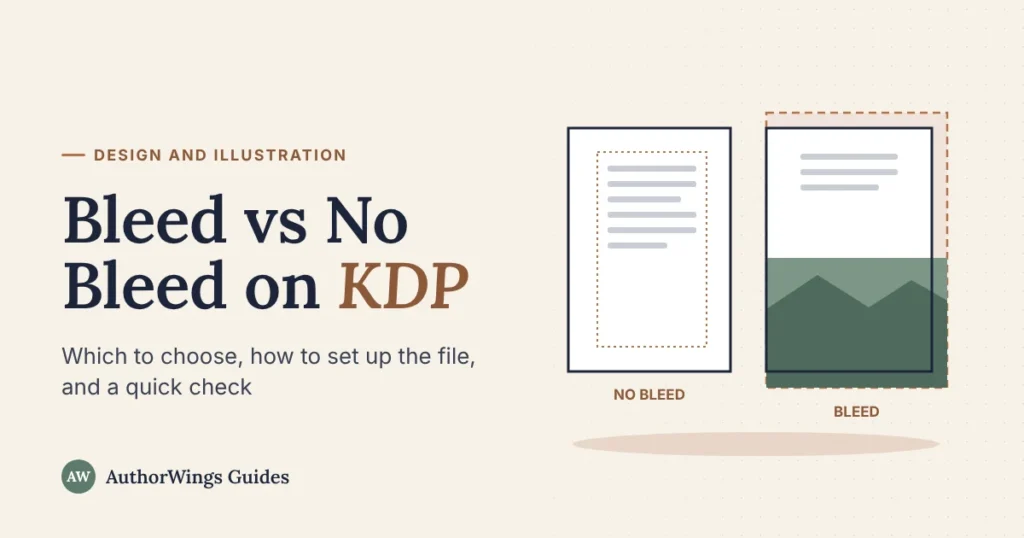
Bleed is extra image beyond the edge of the page. Printers print on a larger sheet and then trim it, and the cut can shift slightly, so anything meant to touch the edge has to run past it or a thin white strip can show.
The same right-hand page, without and with bleed
No bleed: everything stays inside the margins
Bleed: the photo runs past the trim
- Trim line: where the printed page is cut.
- Bleed: 0.125 in past the trim on the top, bottom, and outside edge, cut off after printing.
- Margins: keep text inside them; with bleed, KDP’s outside margin minimum rises to 0.375 in.
- Spine side: no bleed on the inside edge.
Bleed vs no bleed at a glance
The two settings change the page size, the margins, and the file you upload, but not the price.
| No bleed | Bleed | |
|---|---|---|
| Choose it when | Everything stays inside the margins | Anything should touch or run off the edge |
| Page size (6 x 9 book) | 6 x 9 in | 6.125 x 9.25 in |
| Outside, top, and bottom margins | At least 0.25 in | At least 0.375 in |
| File you can upload | PDF, DOC, DOCX, RTF, HTML, or TXT | PDF only |
| KDP printing cost | Same | Same |
| Typical books | Novels, memoirs, text-led non-fiction | Photo books, cookbooks, picture books, books with edge designs |
Does your book need bleed?
Answer three questions about your inside pages.
Does your book need bleed?
Answer for the inside pages only. Covers always have bleed.
The rule: if anything on any inside page should touch the edge, choose bleed. If everything sits inside the margins, as in a typical text-only book, choose no bleed.
How to set up a file with bleed
Set the bleed size first, then place the art. These are KDP’s paperback rules:
- Make the pages bigger. Every page is 0.125 inch wider and 0.25 inch taller than your trim size, so a 6 x 9 book becomes 6.125 x 9.25 inches. The width grows on one side only, because there’s no bleed on the spine edge.
- Extend the art. Anything meant to touch the edge runs 0.125 inch past the trim on the top, bottom, and outside edges.
- Move text in. Keep text and important details at least 0.375 inch from the outside, top, and bottom edges, so the cut can’t reach them.
- Export a PDF. KDP only accepts bleed files as a PDF. Check that the PDF’s page size is the bleed size.
- Match the setting. On the Paperback Content page, set Bleed Settings to Bleed so it matches your file. Don’t add crop or trim marks; KDP doesn’t allow them.
In Word, the page you set up is the full bleed size, so you place edge images to reach the page edge itself, and Word has no trim line to show you. Our Word page setup calculator gives the exact page size and margins for your trim and page count. Layout apps show the trim and bleed lines for you.
Books with only a few full-page images
If even one inside page needs bleed, KDP says the whole file should be set up with bleed, so every page uses the bleed page size. Your text pages don’t change: they keep normal margins and nothing touches the edge. Picture books are usually full bleed throughout; see our guide to formatting a children’s book.
Common bleed mistakes
These problems commonly send a bleed file back for fixing:
- Bleed on the spine edge too. Bleed goes on three sides only, so a 6 x 9 page with bleed is 6.125 inches wide, not 6.25.
- The setting and the file don’t match. A bleed file uploaded with no bleed selected, or the other way round, can be rejected or flagged with size or margin errors.
- Art that stops at the trim line. It needs to run the full 0.125 inch past the trim.
- Text too close to the edge. Page numbers and captions near the edge can be cut or look cramped.
- Bleed lost on export. Some PDF settings save only the trim size; check the PDF page size before you upload.
When to get help
A bleed book is mostly about images, and that’s where layout apps and experience help. AuthorWings formatting starts at $199 for a print interior; picture books and early readers are $299 for print, and photo and diagram layouts are $999 for print up to 100 pages. See our picture book formatting and other packages.
Book formatting
Images to the edge, set up right the first time
We set up bleed, margins, and images for your trim size and check the files against KDP and IngramSpark before you upload.
- Print from $199
- Picture books $299
- Photo layout $999
Frequently asked questions
Does bleed cost more on KDP?
No. KDP says bleed settings and cover finish don’t affect printing cost. The cost depends on your trim size, page count, ink, paper type, and the marketplace where the book is sold. Bleed changes your file setup, not what you pay per copy.
Can I upload a Word file if my book has bleed?
No. KDP accepts Word, RTF, HTML, and text files only for books without bleed. A bleed interior has to be uploaded as a PDF, and the PDF’s page size has to include the bleed. Save the PDF from Word or your layout app, then check its page size before you upload.
Does the cover need bleed too?
Yes. Every KDP paperback cover has bleed on all its outer edges, whatever you choose for the inside pages. The cover template from KDP’s cover calculator includes it. Our guide on how to make a book cover walks through the print wrap.
Does a coloring book or journal need bleed?
Only if the design touches the edge. Line art, borders, or patterns that run off the page need bleed. If every drawing and line sits inside the margins with white space around it, choose no bleed and keep your page size at the trim size.
Related reading
AuthorWings editorial team
The AuthorWings editorial team writes and updates our guides for first-time authors. Every post is read and edited by a person on our team before it is published.