Short answer
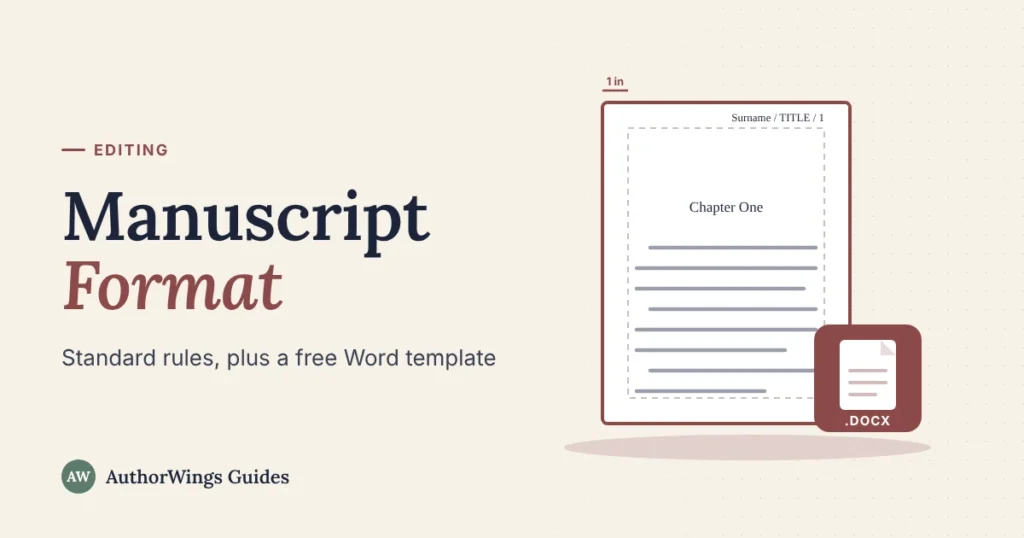
Standard manuscript format is a plain layout that editors and agents expect: US Letter pages, 1-inch margins, a 12-point serif font such as Times New Roman, double spacing, half-inch paragraph indents, left alignment, and a header with your surname, a title keyword and the page number. Each chapter starts on a new page. Always follow an agent’s or publisher’s own guidelines first.
Manuscript format is how your book looks before it’s a book: plain on purpose, so an editor can read it comfortably and mark it up. If you’re not sure where the line between manuscript and book falls, start with what a manuscript is. This guide gives the standard settings, shows a first page and a later page, explains why some guides still say Courier, and ends with a free Word template you can use without signing up. A book editor will expect this layout too.
Standard manuscript format at a glance
These settings work for most novels and non-fiction books sent to agents, publishers or editors in the US.
| Setting | Standard |
|---|---|
| Page size | US Letter, 8.5 x 11 inches (A4 outside North America) |
| Margins | 1 inch on all sides |
| Font | 12-point Times New Roman or a similar serif font, black |
| Line spacing | Double, with no extra space between paragraphs |
| Paragraphs | First line indented 0.5 inch, set in paragraph settings, not with tabs |
| First paragraph of a chapter or scene | Indented like every other paragraph |
| Alignment | Left, with a ragged right edge (not justified) |
| Header | Surname / TITLE KEYWORD / page number, top right, on every page except the title page |
| Chapters | Each starts on a new page, lower down (often a third to halfway), at the same depth every time |
| Scene breaks | A centered # on its own line |
| Emphasis | Italics |
| Spaces after a period | One |
| File | One Word file (.docx), unless asked otherwise |
The first page and the pages after it
A chapter opening carries the chapter title lower down the page; every other page carries only the header and text. The numbers on the two pages match the notes below them.
Chapter opening
Later page
- Header on every page of the text: surname, one or two title words, page number. None on the title page.
- Chapter title lower down a new page, at the same depth for every chapter.
- Double spacing, 12-point serif font, 1-inch margins (dashed lines).
- Every paragraph is indented 0.5 inch, including the first of a chapter.
- Ragged right edge: left aligned, not justified.
- The same header runs on every page.
- A centered # marks a scene break.
- The paragraph after a break is indented as usual.
The title page
A novel manuscript opens with a title page: your contact details at the top left, the word count at the top right, and the title and your name in the middle.
- Top left: your legal name, address, phone and email, usually single-spaced. Add your agent’s details here once you have one.
- Top right: the approximate word count from your software, rounded. William Shunn’s guide rounds to the nearest hundred, and to the nearest 500 for longer works.
- Center, a third to halfway down: the title, then “by” and the name you’ll publish under.
- No header or page number on the title page. Page 1 is the first page of the text.
Short stories put all of this on the first page of the story instead, with the story starting below the byline.
How to set it up in Word and Google Docs
You need to set this up once; then every chapter follows it. Our template has these settings done already.
Microsoft Word
- Layout > Margins > Custom Margins, and set all four to 1 inch.
- Select all text, then choose Times New Roman, 12 point.
- In paragraph settings, set Line spacing to Double, Spacing before and after to 0, and Special > First line to 0.5″.
- Insert > Header, type “your surname / TITLE /”, then Insert > Page Number > Current Position. Tick “Different First Page” so the title page has no header.
- Start each chapter with Insert > Page Break (or Ctrl+Enter on Windows), not by pressing Enter until the page runs out.
Google Docs
- File > Page setup: choose Pages (not Pageless), Letter size and 1-inch margins. Headers and page breaks need Pages format.
- Times New Roman, 12 point.
- Format > Line & paragraph spacing > Double, and remove the space before and after paragraphs.
- Format > Align & indent > Indentation options: first line, 0.5″.
- Insert > Page elements > Header, then Insert > Page elements > Page number, and tick “Different first page.”
- Insert > Break > Page break for each chapter, and download as Microsoft Word (.docx) before you send it.
Classic vs modern manuscript format
You’ll find two versions of the rules online, because the standard grew up on typewriters. Older guides say Courier and underlining; most current guides say Times New Roman and italics.
| Classic (typewriter era) | Modern | |
|---|---|---|
| Font | Courier, 12 point | Times New Roman or similar, 12 point |
| Italics | Underlined | Italics |
| Spaces after a period | Often two (a typewriter habit) | One |
| Use it when | A publisher asks for it by name | Every other time |
William Shunn’s widely used formatting guide, updated in July 2026, says Courier is “probably on its way out” in fiction and recommends Times New Roman, but keeps a Classic edition in Courier for publications that ask for it. If a magazine or contest says “Shunn Classic” or “standard manuscript format, Courier,” use Courier. Otherwise, use the modern settings.
Non-fiction manuscripts: what changes
Non-fiction uses the same base settings, with a few additions for headings, notes and images.
- Headings: use the same style for every heading at each level, so an editor can see the structure. Our template has styles for chapter titles and two levels of subheads.
- Notes: use your word processor’s own note feature, not typed numbers. Many publishers prefer endnotes.
- Figures and tables: number them by chapter (Figure 3.1) and mark where each goes with a line such as [Figure 3.1 about here]. Publishers often ask for images as separate files rather than pasted into the manuscript.
- Quotations: long quotations are set as indented block quotes.
Some publishers have their own rules that override the standard. One university press’s 2026 guidelines for authors under contract, for example, ask for each chapter as a separate file and no Word styles at all. If you’re selling non-fiction on a book proposal, the proposal follows the same base layout.
Picture books are different again: the text only, with short art notes and no illustrations. Our children’s guide covers picture book manuscript format.
Submission rules: the agent’s guidelines come first
Standard format is a default, not a law. Every agent and publisher posts submission guidelines, and theirs win when they differ.
- Read the guidelines for each agent. Requests range from the first 5, 10 or 25 pages to the first three chapters with a synopsis.
- Pasted pages: many agents ask for sample pages pasted into the email or sent through a submission form, and some won’t open attachments unless they asked for them. Formatting disappears there, so add a blank line between paragraphs instead of indents.
- File type: when an attachment is allowed, send Word (.docx) unless the guidelines ask for PDF.
- File name: name the file clearly, for example Surname_Title.docx, unless the agent says otherwise.
- Your query letter goes with the pages. Our publishing guide shows how to write a query letter.
Free manuscript format template
Our free template has every setting in this guide already in place. Open it, replace the sample text, and type.
Manuscript Format Template (free)
Download the Word template (US Letter)- A title page with fields for your details, word count, title and byline
- A header that adds your surname, title and page numbers by itself and skips the title page
- Styles for body text, chapter titles (each starts a new page, a third of the way down), chapter names, scene breaks, non-fiction subheads, block quotes and figure notes
- A sample chapter that shows each style in use
The guide and before-you-send checklist are a separate PDF, so nothing extra ends up in the file you send. Free to use for your own manuscripts.
Manuscript format vs book formatting
Manuscript format is for the people who read and edit your book; book formatting is the designed interior readers buy. Don’t send a manuscript laid out like a finished book, and don’t publish a manuscript as it is.
Once editing is done, the manuscript becomes a typeset interior at your trim size, with designed chapter openings, running heads and fonts chosen for print. To do it yourself in Word, start with the KDP Word template. That’s a separate job: our interior formatting service handles it from your edited Word file.
When to get help
Format your manuscript yourself with the template; it takes an afternoon. Before you send it anywhere, work through our self-editing passes. Get help when the words, not the layout, need work.
- Before you query or publish: a copy edit fixes grammar, spelling and consistency and comes with a style sheet. For fiction it’s $240 for the first 10,000 words, then $0.024 a word.
- Not sure which edit you need? Our guide to editing vs proofreading explains the difference, and a $49 sample edit of up to 1,000 words tells you which level your draft needs.
One lead editor handles the edit, with a fresh proofreader for the final check.
Book editing
Formatted and ready for an editor
Send your manuscript in standard format and get a flat price by genre and word count. Every edit comes back in tracked changes, done by a human editor.
- $49 sample edit
- Copy editing from $240
- Human editors only
Frequently asked questions
Do I have to use Times New Roman?
No. Times New Roman is the safe default, but any plain 12-point serif font works for most agents, such as Garamond or Georgia. Avoid sans-serif and decorative fonts for the text. Courier is fine if a publisher asks for it, but some current guides say it’s on its way out. Whatever you choose, use one font throughout and check each agent’s guidelines.
Should a manuscript be single or double spaced?
Double spaced, for the whole text, with no extra blank line between paragraphs. Double spacing gives editors room to mark changes and makes long reading easier. The exceptions are your contact details on the title page, which are single-spaced, and sample pages pasted into an email, where you separate paragraphs with a blank line.
Should I send my manuscript as a Word file or a PDF?
Send a Word file (.docx) unless the guidelines ask for PDF. Editors work in tracked changes in Word, and many agents prefer it too. If you write in Google Docs, Scrivener or Pages, export to .docx and check the header, page breaks and italics before you send. Some agents want no attachment at all, only pages pasted into the email.
Does a self-published book need standard manuscript format?
Not for readers, but it helps before that. Your editor will work faster in a standard manuscript, and a formatter needs a clean file with consistent styles to build your interior. The finished book is then laid out at your trim size, which is a different job from manuscript format.
Related reading

AuthorWings editorial team
The AuthorWings editorial team writes and updates our guides for first-time authors. Every post is read and edited by a person on our team before it is published.